
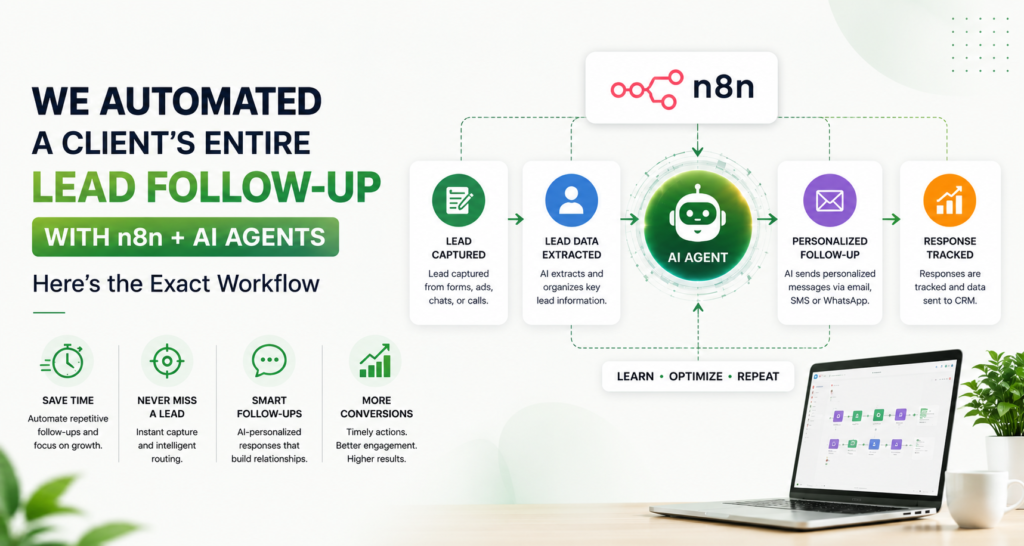
We Automated a Client's Entire Lead Follow-Up With n8n + AI Agents — Here's the Exact Workflow
A lead rarely disappears because the business has no offer. It disappears because nobody follows up at the right moment, with the right context, on the right channel.
That was the problem we set out to solve: turn a new enquiry into a structured follow-up process that could run continuously, while keeping people in control of sensitive decisions.
The solution was not “let AI send messages.” It was a workflow: n8n handled orchestration, an AI agent handled interpretation and drafting, business rules handled routing, and human approval stayed in the loop where the risk was higher.
The Real Problem Wasn’t Lead Generation
The client already had lead sources. The operational gap came after the form was submitted or a prospect made contact. Lead data had to be cleaned, intent understood, the right owner notified, and follow-ups scheduled. Every handoff created another opportunity for delay.
The first design decision was therefore important: automate the process, not the salesperson.
The Exact Workflow Architecture
The AI agent can process a campaign brief quickly and identify potential audience segments, pain points, objections, search questions, messaging angles and content themes.
It can generate a large number of possibilities in a very short time. But speed isn’t the same as understanding.
A human marketer can ask: “Would our customer actually say this?” Experience helps marketers recognize when a technically logical segment does not match real buying behavior.
The takeaway: AI wins on research speed. Humans win when context matters.
The Exact Workflow Architecture
1. Lead Capture
The workflow begins when a lead enters through a form, CRM, webhook or another connected source. n8n can connect triggers and actions across a workflow, allowing lead data to move between systems instead of being manually copied.
2. Normalize the Data
Before AI sees the lead, the workflow standardizes fields such as name, company, email, phone, source, enquiry text, service interest and timestamp. Missing values are flagged rather than silently invented.
3. AI Qualification
The AI agent receives a controlled prompt containing the business’s qualification criteria. It can classify intent, summarize the enquiry, identify the likely service need and assign a confidence level. The key is structured output—not a free-form paragraph.
For example, the agent can return: lead_status, intent, service, urgency, summary, recommended_next_step and confidence. This makes the AI output usable by downstream automation.
4. Lead Routing
Business rules then decide what happens. A high-intent lead can be assigned immediately to a salesperson. A low-intent enquiry can enter a nurture sequence. An incomplete lead can trigger a request for missing information. A suspicious or ambiguous case can be routed to a human.
5. Personalized Follow-Up Draft
The AI agent drafts a response using the actual enquiry context, approved brand language and the next best action. It should not invent discounts, guarantees, case-study numbers or product capabilities. Those facts should come from an approved knowledge source or fixed workflow data.
6. Approval Where It Matters The Workflow in One Line
Lead enters → data is normalized → AI classifies intent → rules score and route the lead → AI drafts the next response → approval is requested when needed → message is sent → CRM is updated → follow-up timing is scheduled → replies or conversions change the workflow state.
The Prompt Is Only One Component
A common automation mistake is spending hours perfecting the AI prompt while ignoring the data entering the prompt. If the lead record is incomplete, the agent may produce a polished but poorly grounded answer. We therefore treat data quality, business rules and approved context as first-class components of the system.
The prompt should explain the role, objective, qualification criteria, allowed claims, prohibited claims, response format and escalation conditions. The workflow should also validate the output before anything important happens. For example, if the AI returns a confidence value below the defined threshold, the workflow can send the lead to a human instead of forcing an automated decision.
Where the Human Still Matters
Sales is not a perfectly deterministic process. A prospect can mention a small request while actually evaluating a much larger project. A returning customer may need a different response from a new lead. A message that looks urgent may simply reflect the prospect’s communication style. These are situations where human context can outperform an automated rule.
That is why a strong workflow includes an exception path. The objective is not 100% automation. The objective is to make the normal path fast while making the exception path obvious.
A Practical Launch Checklist
Before going live, test the workflow against historical leads. Check whether fields map correctly, classifications are consistent, messages use approved information, duplicate leads are handled, opt-outs are respected and failed actions create alerts. Run the workflow in a test environment first, then use a limited live rollout before expanding it.
Also document who owns the workflow. Automation without ownership becomes technical debt. Someone should review execution logs, update qualification rules, refresh approved messaging and investigate failures.
Not every message needs manual approval. But high-risk actions should have a human checkpoint. n8n documents human-in-the-loop patterns for AI tool calls, and its Gmail integration can pause before an AI-initiated email action is executed.
7. Send, Log and Schedule
Once approved—or when the action falls inside a pre-approved rule—the workflow sends the message, records the activity and schedules the next follow-up. The CRM becomes the source of truth rather than the salesperson’s memory.
8. Follow-Up Logic
The workflow then checks for signals. If the prospect replies, automation can stop the sequence and alert the owner. If there is no reply, the next message can be scheduled. If the lead books a meeting, the workflow can move the contact to a different stage.
What Made the Workflow Reliable
The biggest lesson was that AI should not control the whole system. It should operate inside a system of constraints.
We separated the workflow into three layers: deterministic automation, AI judgment and human judgment. Deterministic rules handled timing, routing and data updates. AI handled language and classification. Humans handled exceptions, commercial judgment and sensitive decisions.
How to Build This Without Overengineering
Start with one lead source and one follow-up journey. Define the qualification fields, create an approved response library, build the n8n workflow, add logging, then test with real historical leads before switching on live sending.
Measure operational outcomes: speed to first response, follow-up completion, lead-routing accuracy, reply rate, booked meetings and the number of leads requiring human correction.
The Bigger Lesson
The most useful AI automation is rarely a single clever prompt. It is a reliable system around the prompt.
n8n gives the workflow an orchestration layer. AI adds flexible interpretation and drafting. Your CRM provides context. Your team provides judgment.
That combination can turn follow-up from a fragile manual task into a repeatable growth process—without pretending that every sales decision should be delegated to a machine.
Frequently Asked Questions
What can n8n automate in lead follow-up?
n8n can orchestrate lead capture, data transformation, routing, notifications, CRM updates, AI classification, message drafting and scheduled follow-ups across connected systems.
Can AI agents qualify sales leads?
Yes, when qualification criteria are clearly defined and the agent returns structured outputs. Human review should remain available for ambiguous or high-risk cases.
Should AI send follow-up emails automatically?
It can for low-risk, pre-approved scenarios, but sensitive commercial actions should use approval rules or human-in-the-loop controls.
How do you prevent AI from inventing information?
Use approved knowledge sources, structured fields, strict prompts, validation rules and explicit instructions to abstain when required information is missing.
What should be measured after automation?
Track response time, follow-up completion, routing accuracy, reply rate, meetings booked, conversion rate and human correction rate.
Is n8n suitable for small businesses?
It can be, especially when the business needs workflows connecting multiple tools and wants more control over logic than a simple single-step automation provides.